Showing posts with label Technology. Show all posts

Monday, 9 July 2018

Three Dangerous Types Of Hacking Attacks On The Internet That You Must Know (Be Secure & Safe)

The internet is a huge sea of knowledge and other weird stuffs. When we get connected to the Internet, we got entered in a new world where limits become limitless. But it seems that internet is also full of predators who are continuously trying to steal and attack your data. So today we are going to discuss some various weapons or techniques used by these predators as well as how to avoid those attacks.


DOS & DDOS

Denial of service is a effective hacking technique used by hacking groups at large level. Typically hackers use this technique to send a lot of traffic to a server. Because of which the server can not handle such load and people can not open that website. That means the server is down.
Denial of service can slow down a website or even shut down for some time. Denial of service or distribute denial of service technology was discovered in 1998.


1.Why DDoS Attacks are used?

i. To eliminate server bandwidth, disk space and processor time.
ii. To corrupt the confirguration information.
iii. To keep users away from the site.


Attack Types

Ping of Death: In Ping of Death the server is sent to illegal ping of packet, due to which the system may crash.

SYM Flood: In SIM Flood, TCP / IP packets are sent to the server with a large number of incorrect sender addresses.

Teardrop Attacks: The Teardro attack, the operating system's bugs are exploited.

Peer-to-Peer: Peer-to-Peer attack does not include the attacker directly, instead he acts as a master and dictates the client to connect to victim's website.


In today's Ethical Hacking Beginner tutorial, we will talk about what happens to the man in middle attack of hackers and how dangerous this attack is.
 So in this post we are also going to tell you how to avoid man in middle attack, so that you can keep your data safe from hackers.
What is the man in the middle attack in this post today? How to do a hacker man in middle attack and how we can avoid this will discuss these three important issues. So let's start.
First of all, man in middle attack knows what it is all about.


2.What is Man In Middle Attack? How does this happen?

Friends, this attack of hackers is called Middle Man Attack, someone means a person who is in the middle. The work of this attack is similar.
In this hacking technique, a black hat hacker is sitting between two people and he accesses the data of both the people first and then read the draft and then changes it and then returns it to the next person.


                             EXAMPLES

For example, suppose I sent you an email in which I wrote that I loved your nature and I want to be your friend.
After writing such an email, I sent it to you and it will go away from my computer but before reaching you, the message will reach someone else's person, and then after that, he will change that message according to your own accordingly, and send it to you.

For example, suppose I sent you in a message that I liked your nature and wanted to be your friend.
So if he wants a hacker he can write that I do not like you!
The message of email that you will get from this will be mine, but the message that has been changed will be changed by the hacker.
Similarly if you reply to my email saying such a quote? Then again this message will go to hacker from where it will change it and then forward it to me.
In such a situation, both of us will think that we are talking about both, but in reality our every thing will go through a black hat hacker sitting in the middle and the messages that we both will get will be sent by the hacker.

In this way, this man is in the middle attack, which is very dangerous. This can be easily fought between anyone or any hacker can misuse it.

Example - If you have sent a message to a man and he goes to the message hacker, then the hacker can ask for money from you in his reply. He can say that you will have to pay fifty thousand rupees to join our company.
In such a situation, we will feel that this email has come from the man whom we had mailed for jobs, when in reality it was sent by the hacker.
If it is to be mentioned briefly, there is no communication between us and the person in front of the man in middle attack. Instead of sitting in between the two, the hacker only looks at both the messages and modifies it accordingly, and then forwards the forward.
Now it is common for two people to talk, a hacker can read their words and change. But as much as you are thinking, man in middle attack is more dangerous and fatal than him.
Even if the hacker also changes our message, we can tell that person by talking to the phone or meeting face to face, that whatever happened has happened due to man in middle attack. But if this is the same thing about a big named company ??
Suppose a hacker needs your bank's confidential information, then he can easily get that information from man using these middle attack.
You will not even notice that when you handed over your bank account information to a hacker with your own hands.

Example - a hacker that the user name and password, such as your bank's sensitive information should, then you have to change the password of your bank caused some emails or will message to the registered mobile number directly.
And by giving a link to that message or email, they will ask you to click on it. And when you open those links, you will be shown a fake website that looks exactly like your bank's website.
You'll also see the URL in your browser as well as on your bank's website. HTTPS Security will also be seen but the website will be fake which we call masking or fishing. Through this, you will be confused that you are on your bank's website but in reality you will be on a different website.
When you reset your password, your username and old password will be stored, which will be stored in the database of the hacker's site directly, so that it can do anything with your bank account.
Now when the upi system was new, 4 boys in Maharashtra hacked the UPI app and removed 9 crore more than the bank's bank accounts.
I just gave you an example of how much harm a hacker can make to us from man in the middle attack. Using this technique, more such things can be done which we can not think of.
Now you might have come to know how dangerous man is in attack and how a hacker man in middle attack. So let's also know the solution of how to avoid it.

How to Avoid Prevent Man In Middle Attack?

To keep yourself safe from this attack, I am telling you some effective methods that you can use to prevent man in the middle attack.

1. Mutual Authentication - If you want the hacker to not read or change your message, you can use the manual authentication. With this you will be able to see any data you share with others.

2. Encryption -The second way is encryption. This protects our data to a great extent. Because if we encrypt a document, file, picture or any type of data, then it translates into a binary language. Meaning if any of the decryption is opened to him, then it will be seen in both digits 0 and 1, which can be understood only by the computer, not the person.
And only that computer can translate that document into a human language that has the decryption key you have defined.

3. Password -If your data is not so secret then you can just keep it safe by putting a password. Because in most cases the middle man is attacked when the data is quite secret or appropriate.

4. Digital Signature -Just like encryption, digital signature is a great way to keep your data safe ...!
You can create your digital signature from any trusted third party site. For this you have to scan the retina and fingerprint which will act as a digital signature.

5. Be Sure Before Clicking -If you come to email or text messages from any company or site first you know that something like this has happened and the message has come from the real company, after getting the full information, then open that link.
If you also suspect that email is spam, then do not open that link and do not share your intelligence passwords with anyone.


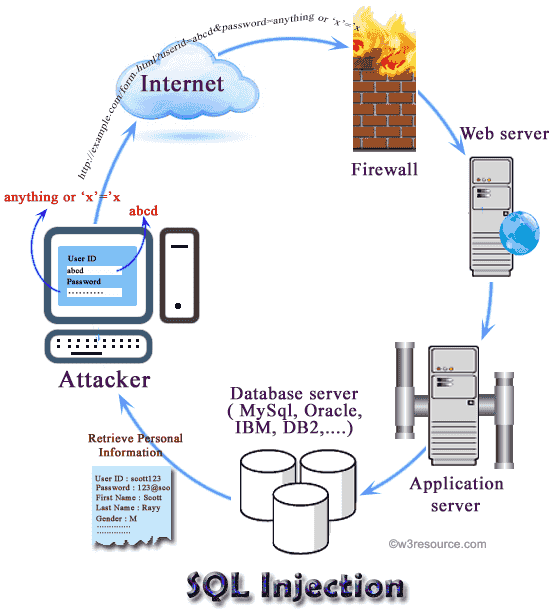
                      3.MY SQL INJECTION


When we accept User Data through a User Form on an HTML Page, then instead of inserting the normal data in the HTML form, the user gives Data Insert several times, which can be used by the Directly Server Side Script without checking it. If the entire database is corrupted, after the deletion of a table, the Blog / Site is hacked, or Stored Security Related Sensitive Data is likely to leak in the Blog / Site database, Can be used from
When a user specifies a SQL Query in place of a Site / Blog in such a way as to replace Normal Data on the HTML Form or to enter the Sensitive Section of the Database, this method is called the SQL Injection Attack. And we must use Web Developer to use all possible precautions to protect your Site / Blog from the SQL Injection Attack.
Let us first try to understand this SQL Injection Attack properly.
Let's say that there is a Login Webpage in our Web Site, by specifying Username and Password, any valid user can access the Secure Area of ​​our Website.


When User submits your Username and Password to Login to this form and submits Login Form, then Username and Password of that HTML User Form is extracted on the Web server, and this Username and Password will be backed up on MySQL Database as follows. By using a query, it is detected that the Specified Username and Password is the Username Password of a Valid Authenticated User or not%
SELECT * FROM usertable WHERE username = '$ input_user' AND password = '$ input_pass';

If there is a Record Return on the above Query Fire, it means Existing in the Specified Username and PasswordDatabase. That means a user having Specified Username / Password can be redirected to the website's Secure Area.
If the above username and password are coming to the user form before the above Query Fire, then it is okay. But if the username and password coming through the User Form is not sanitized, then user can submit the form to Username as "anything" OR 1 = 1 - "and password as" anything "Insert and If the user does this, then the above will be the fire in the SSQL query actually the form will be in the fire%
SELECT * FROM usertable WHERE username = 'anything' OR 1 = 1; - AND password = 'anything';
When the above query will be Execute, it will pass the query user to the Secure Web site, whereas Use Tum has not specified any valid information in the form of Username and Password.
This is because "-" is used for commenting in MySQL and many other Databases. That is, everything written after "-", MySQL ignores it.

Whereas, in the above query, "nothing 'OR 1 = 1;" For specifying MySQL database, that's either username =' anything 'or 1 = 1 is true.
Now if the current database will have a user named 'anything' then condition will also be true, and if there is no user named 'anything' in the current database, then OR will be 1 = 1Statement Execute, which will return True True because we have 1 Is equal to 1 Not only that, by specifying "-", just after 1 = 1, the user has converts the entire SQL Query into a Comment.
As a result, MySQL Database will not check password by executing this statement further, and by making Final True Return it will assume that Current User is a valid user and will redirect it to the website's Secure Area.
In this way, the SQL Statement, written in the Sensitive and Secure area of ​​a Site / Blog, without valid Valid Username / Password, is called the SQL Injection Attack and to avoid such a SQL Injection Attack For WordPress, we provide prepare () method, which we have used in previous sections.
This method follows the syntactic method of printf () method of "C language". But while using this method, we can set the% strings or the% strings with their order. like:

             
<?php
    global $wpdb;
    $name = "Kuldeep";
    $email = "admin@bccfalna.com"; 
    $wpdb->query($wpdb->prepare(
        "INSERT INTO registration(name, email) VALUES ( %1$s, %2$s )", $name, $email
        ));
?>

As we can see in the above code, how we specify% s Control String with n $ and when we specify Control Strings in this way, we can set the values ​​to any position. You can specify. That is, we do not need to take care of the sequence. For example if we modify our previous code's SQL Statement as follows:

"INSERT INTO registration (name, email) VALUES (% 2 $ s,% 1 $ s)", $ email, $ name
Then instead of% 2 $ s, the value of the $ name variable will be Replace, because it is the value of the second Argument in the list of Argument, which is $ name. Similarly, instead of the% $ 1 $ value, the value of the $ email variable will be Replace, as it is in the list of arguments, to be replaced by the value of Argument, which is $ email.
As a result, the above statement will also store Stored Values ​​in $ name and $ email variables in the name and email fields in the Registration Table in the same manner as the SQL Statement specified in the previous code.


Saturday, 6 January 2018

Difference Between Core i3, i5 And i7 Processors Explained.


As in Intel and AMD comparison we saw that in price to performance ratio the AMD processors were good in comparison with Intel processors whereas when we talk about higher end segment, the AMD(no doubt that they are good too) processors looses their periphery.

Also see: "Different between AMD and Intel processors".

As in a case of AMD and Intel people often get confused in Intel's processor range also. Intel processors are good for your work when you are building a higher end PC for your workstation. Intel is using the model name core i3, core i5 and core i7, for a long period of time. And these specific models are very good in their category and work. But when you are going to buy an Intel processors then you got a little bit confuse, that what to choose from these models and which one is right for you?

That's why in this topic a deep comparison has been made between for you about these models of Intel's processors, that will help you to choose a right one for you. The one of the most important thing that you need to know about these processors that the naming scheme that you see in these processors. It is a way to separate their CPU range or CPU performance. So simply here:

Intel Core i3: Lower - end or Entry level.
Intel Core i5: Mid-range or Mainstream.
Intel Core i7: High-End.

Also one thing is to be noted that there are different generations of these processors made by Intel. Normally, the newer generations of these processors are capable of performing well than their previous generations and may also have higher clock speed. So in this topic I am also discussing about how to identify these generations? And the terms like Hyper - threading,  Cache - size, Physical cores, Graphics performance, Price and Over - clocking abilities of these processors".

So Let's Explore..................................................

Model Numbers- what is the mystry hidden behind them

Generally, if we are talking about these processors or any other processor brands. They all have one thing common on their own, as they all have different model numbers.

"A model number is a combination of  letters and numbers that defines the generations and abilities of a processor".

As we are talking about model numbers in Intel processors, then we should consider two main points;
• Generations
• End Letters (U,Q,,H and K)

1.Generations: The generation of a processor tells about its performance and efficiency as well as its ability to do work. A generation also tells about the size of the transistors used in the making of a CPU. Generally, Intel reduces the size of their transistors whenever they launches their newer generation of processors. As previous years, Intel uses 28nm of transistors for making their processors, now it uses 14nm of Transistor for making their processors and this is reducing year by year. Also you must know that;

"The smaller the size of Transistor the faster the processor".

This is so because if you decrease the size of a Transistor,  then you can add more Transistors in a processor and this will boost up the processor's speed and efficiency and also the processor will consume less power. So, the more the number of transistors, the faster the CPU will perform.

Identifying Generations


You can identify the generations of these processors by only looking at their first numeral that is given in the model name of that processor. For example, consider a processor, Intel Core i3 -5200, the first number in this model name is 5, it means that it is a 5th generation processor.

 Also do note that, the newer generation 0f Intel processors  does not support windows 7. They only support higher version of windows like, windows 8, 8.1 and 10 or windows 10 pro.

An useful tip: The other three digit of these processors indicates their performance. For example, a processor Core i3-5350 is better than Core i3 -5200. 

What does core i7, i5 and i3 mean

Intel launches their newer generations of i3,i5 And i7 processors, time to time. But the peoples often confuses about their performance and number of cores they have. Don't worry it's not so hard that you thought.

Simply and purely speaking, core i7 is better than core i5 and core i5 is better than core i3 (i7 <i5 <i3). But if you go deeper and deeper you got little bit confuse. As first of all core i7 does not means it is a seven-core processor. These are only just naming scheme that indicates their performance.

Generally, core i3 series of processors have dual cores whereas core i5 has quad cores and core i7 has quad or octa-cores. Normally,

"Quad-Cores are better than Dual-Cores and Octa-cores are better than both Quad-Cores and Dual-Cores".

2.End-Letters (Q,U,H,Y,T and K): The Intel has changed their naming lists. The model number typically have one or more combination of the following letters namely: U, Y, T , H, K and Q. Of course, you are now thinking about what does they mean? So here is your solution;

• U: Ultra Low Power- These are the processors that draw less power and provide an optimum performance and better battery life. Thus they are power efficient. The U rating processors are generally used in laptops.

Y: Low Power- These processors were generally found in the older generation of laptops and mobile processors.

• T: Power Optimized- These are the processors that are generally used in desktops.

• Q: Quad-Core- These category of processors have Quad-Cores or four cores. Generally, letter 'Q', indicates Four cores or Quad-Cores.

• H: High - Performance Graphics: The processors of this category have Intel's better high performance GPU or graphics.

• K: The letter 'K', indicates that the given processors can be over-clocked or you can increase its clock speed or frequency.

So I hope that you have understand well about the basics of identifying the Intel processors only by looking at their model names. So now let's know about some basic terms that are common in the processor world.

Hyper-Threading

As you know now, Intel writes the letter U and Q for indicating the number of physical cores in their processores. So now the question arises that, Is there any other type of core available in the processors? The answer to this question is, 'Hyper-Threading'.

'A Hyper-Threading is a technique or method in which the operating system understands that a (dual core, quad core,  octa core or or any other core ) CPU has more cores than the given physical cores. Thus making the processing power more efficient and effective".

In nutshell, Hyper-Threading allows a single physical core to act as a dual virtual cores. This makes the processing more efficient because during this process the multiple tasks are processed simultaneously, without activating the other core and this in terms consumes less power which saves more battery in a system.

Also read: "What is processor binning".

If both physical cores of the processor are active and Hyper-Threading is enabled, then those four virtual core ( two virtual cores of one physical core) will help to process a task faster. However, it is important to note that a physical core is more faster than a virtual core. So it means;

"A quad-core CPU will be faster and perform much better than a Dual-Cores CPU with Hyper-Threading enabled".

Generally, core i3 and core i7 series of the processors are Hyper-Threading enabled whereas core i5 does not support Hyper-Threading feature.

Over - clocking


Over clocking a CPU means increasing its processor speed. The speed of the processor is measured in Gigahertz (Ghz) or Megahertz  (Mhz).

"Over - clocking is a technique in which an user can increase or decrease the processing speed of a given processor than the default normal range provided by the manufacturer".

In some specific models of Intel and in AMD processors, you got an option of increasing the speed of their processors than the default normal range that is provided by the manufacturer.

It is very easy to identify a processor that support overclocking. Only you have to do this, look at the given model number carefully, if the last letter ends with 'K', then that means the processor is overclockable. For example, In AMD 6400K, here K indicates that this processor is overclockable.

However if you are going to overclocking a CPU then you must invest in a better cooling system, because an over clocked CPU produces more heat than the normal one and also you must have to buy a compatible motherboard that supports overclocking feature. Overclocking is useful only when you are going to do some resource intensive tasks like gaming, rendering 2D or 3D graphics, editing sound videos and images, etc. However, if you are only going to do casual browsing and MS Office, then there is no need of overclocking.

In Intel processors range the core i3 does not support overclocking whereas core i5 and i7 support overclocking.

Cache Memory

Just like RAM, the cache memory of a processor is its own memory or RAM. And it is one of that thing which is ignored by many of us during the performance checking of a processor. A cache memory is a very small memory, roughly upto 512KB to 14MB (it generally depends on the model of the processor you are purchasing) but it is a vey fast memory. This memory of the processors are used for storing the data about the frequently running programmes and softwares. This memory is a fixed memory and you cannot increase or decrease it.

As we know that, the size of the RAM matters a lot. So as RAM the size of cache memory also matters a lot. As, "the more the cache size will be, the more faster the processor will process a task". Generally, the size of cache memory in core i3 is upto 3MB, core i5 is between 3MB to 6MB and core i7 is between 4MB to 8MB.

Graphics

Every processors of the Intel family comes with its right hand, that is an 'integrated graphics'. Again Intel has customised it's integrated graphics family with its confusing naming scheme. There are three levels of graphical processing unit in Intel family and they are;

• Intel HD
• Intel Iris
• Intel Iris Pro

You will find model names like Intel HD 520, Intel Iris Pro 580 and Intel Iris 550. These model names of integrated graphics family of Intel can make you little bit confuse now. Lets see an example;

Here Intel HD 520 is an entry level integrated graphics and Intel Iris 550 is better than Intel HD 520, but also an entry level integrated graphics. But Intel HD 530 is a high end graphics and is better than Intel Iris 550. However, Intel Iris Pro is also a high end integrated graphics and is better than Intel HD 530.

Only a way to solve this confusion is that, look at the model name of the processor. If it ends with H, then you are choosing a right one for you because it contains best integrated graphics of Intel's family.

Comparing Core i3, Core i5 and Core i7

You have learn some basic differences if these three processors. Now let's take a quick look or summary of these processors. Here turbo boost means overclocking.


So here you can understand it clearly about each of these processors, that what are their uses for your requirnments. So generally speaking,


• Core i3: An entry level processor for basic users only. Good for whom who are building or buying a budget desktop and laptops and wants a Desent performance at lowest price. It is a desent processor for casual uses like net suffering, using MS Office,making video calls, watching videos and movies listening to music and playing a lower end or mid-range games. You can play high end games but you have to invest in a good Graphics card but must remember that if you are a heavy gamer or a professional user, then, The Core i3 
is not that what you are looking for.


• Core i5: Intermediate users only. This processor is for those who wants a balance performance at an adequete price. Good for gaming if you buy a HQ or a Q model processors with a good Graphics card.


• Core i7: This processor fits for those, who are professionals and do some resource intensive tasks like high end gaming at higher fps, rendering graphics, editing sound videos and photos, creating simulations etc.  This is the best processor from the Intel family that you can get right now.

The Conclusion

We have seen now the basic differences between these processors. The requirment of processor mainly depends upon two things and that are, budget and uses. So now from the above disscission we can easily conclude now that:

If your requirnments are only limited to casual uses and you are not going to do much intensive works on our PC, then the Core i3 is more than enough. But if we want a good performance at the good price the core i5 is more than enough but if you want an excellent and mind-boggling performance then, The Core i7 is what you are looking for.

If you like this post then please share it to your circles and comment If you have any questions about this topic and don't forget to subscribe to our blog for more featured posts.

Thanks.


Tuesday, 2 January 2018

AMD vs Intel: The war that never ends.


When you plan to buy or build your own PC, for the first time, and you have chosen all those essential parts that require you to build your dream PC, then suddenly a thing happens, everything comes to an end, you started to thinking twice, trice and even more. And that one thing is processor.

Also see: Difference between Core i3, i5 and i7 processors explained.

Yes, many of us got confused to choose the right processor for our PC and due to this, sellers started to trade on. And after this step your dream PC becomes a hell. You may get a processor that is too slow for your work or you get a processor that is more than enough but very costly and out of your budget. That's why in this topic a basic difference between the two dominating and most respected brands of processors(Intel and AMD) has been made which will guide you through the basics of buying processors upon your requirements and needs.

The differences has been made on the basis of performance, power consumption and price. Please note that here I am not going to tell you that which specific model of these processors are better. Here I am only going to tell you that what is the basic difference between these two processors on the basis of the criteria given above.

So Let's Explore...................................................

Price:


When people wants to buy a laptop or a desktop then they got a little bit confuse in a common question that what should they choose for a processer? Is it Intel? or Is it AMD? As we are talking about price then most of us are fimilar that Intel processors are a little bit pricey than AMD processors.

To know this criteria clearly and easily let's put these two processors on a 1 to 10 price scale. So if we consider Intel then the price range of Intel processors will go on 4 to 10 on this scale whereas the price range of AMD processors will go on 2 to 8 on this scale.

So in this, if you compare both of them neck to neck then you will find that AMD processors are little bit cheaper than Intel. So at this point if you are buying a budget laptop or desktop, then you must consider an AMD processor as compared to Intel, if your budget is not so much. Because if you choose an Intel processor at this range then you won't get a good performance that AMD will provide you at this cheapest price weather it is desktop or laptop.

So if you are planning to buy a laptop or desktop upto 20 to 35K, then an AMD option will be a healthy choice for you.

Power consumption:


Power consumption of a processor is that criteria you must consider first if your electricity bills makes you heart attack. So talking about power consumption of these two processors, the things got reversed.

AMD processors consumes more power as compared to Intel processors. The power consumption or wattage of Intel processors are much lower as compared to AMD processors that is almost 50% of AMD processors.

So in this case if you are going to buy a laptop or desktop and you are going to works for hours on it, then you must consider an Intel processors as compared to AMD processors because Intel based processors will consume less battery and electricity and will provide you a longer battery life in laptops.

You can buy Intel based laptops between 30K and above. Also AMD processors runs hotter than Intel processors and this affect the performance as well. So if you don't like heating issues then you must consider an Intel based computer.

Performance:


In performance there is no doubt that the performance of an Intel processor is far better than AMD processors weather it is a higher end segment or lower end segment. But if you consider this point on the basis of price range then you will see that the performance of an AMD processor is better than Intel processors.

Because if you consider a lower model of Intel processors on 1 to 10 scale, then you will find that the lowest model of Intel processor is on the 4th scale. So on this scale you will get a little bit higher version of AMD processors bit a lOwer version of Intel processors. So in this case the performance of AMD will be better than Intel. But if you consider a lower model of AMD processor on 1 to 10 scale then you will find that the lowest model of the AMD processors is on 2nd scale. And if you compare this version to Intel's lower end model then you will find that the performance of Intel processors is on higher side as compared to AMD.

Conclusion: The war of processors will never end. There are many things to say about them but it is not possible here. The performance and efficiency of a processor depends on many criteria like layout and design, architecture, overclocking ability, etc. The binning of a processor gives them a category that is, entry level processors, mid-range processors and high end processors.

Also see: "processor binning explained".

If you are budget friendly an also wants a better performance then AMD will serve you better than Intel. Because the performance that you will get in that price segment, will be much better than Intel processors But if we talk about higher end segment then we see that the AMD processors lags somewhere behind of Intel processors.

On the other side, if you are a heavy user and loves to play high end games(I does not means to say that AMD processors are not good for gaming) also if you are going to do a high end works like audio video rendering and editing, developing an app or games or rendering high end graphics then nothing left here to say about AMD, Intel wins the war.

On the other hand, if we talk about  compatibility like if you wants to change the processor in the future, then Intel here wins again. There are more options available in Intel for compatibility as compared to AMD. For example, you can change from i3 to i5 easily on the same motherboard of your Intel's processor whereas you may have to change the whole motherboard of your AMD processors whenever you upgrade.

So in nutshell, if you are a budget friendly and don't require any high end tasks and wants a good performance at lower price then just go for AMD don't look for Intel but if you are going to buy or build high end PC or laptop then the Intel is waiting for you.

Please don't forget to share this posts to your circles and comment If you have any question or queries.

Monday, 1 January 2018

Top Ten Smartphone Myths That You Must Know.


Smartphones has become a crousial part of our life today. It is like your 24×7 assistant. It seems that when we buy a smartphone then we got connected to the whole world. Weather it is computing related works, entartinaing yourself, reading books, news, magazine, gaming, etc, we come to our assistant, the smartphones. But today, in 21 century we believe in some superstitious and myths that has no meaning in our life, and the smartphones also is not untouched to these myths. In this part, I have tried to busts some common myths, which are not more than a gimmick, related to the smartphones.

So Let's Explore..................................................

1.Turning off your phone will not consume your battery:


Peoples generally thought that if you turn off your smartphone then your battery will not discharge. However, this is not true, because in today's smartphones, if you turn off your smartphone then your processor will run in the background.

You must have noticed sometime that when you switch on your smartphone after turning it off then cellar related notifications that you have missed is shown by your smartphone after booting. This happens because a phone generally has two O.S.- one operating system manages your celluar related works while another one manages your software, multimedia  and processing related works.

So when your smartphone is switched off then the operating system that has programmed to manage your celluar systems, runs in your smartphone even after it is switched off.

2.Fourty one megapixels wow!:


"More is better", however that's not true in the case of your smartphone's camera quality. It means to say that the quality of your camera does not depends on its megapixels. It is a common question asked by the peoples that, How much megapixels does this phone's camera have? Well their main aim is that if they got a smartphone with higher megapixel camera then it will be decent for pictures. But you must have saw that most of the smartphones have a decent camera ranging from 5MP-15MP.

But the thing is that the photos you take from your smartphone's does not depends mostly on megapixels. You have saw in flagships and midrange smartphones have a same megapixels of camera, but the picture taken from flagships have more vibrant and natural looking photos.

This is because there are various factors that add up the quality in your photos and rpodece a great looking image. And these factors are sensors - like OIS (Optical Image Stabilisatio), face detection, atuofocus, ISO, shutter speed, camera resolution, camera lens and aperture size. So if you want to buy a smartphone mainly for camera the must consider these factor, not blindly trust on megapixels. A higher megapixel camera is good for printing out bigger pictures without much distortion.

3 . Higher battery capacity Longer battery life:


Again we encounter, "More is better", well this seems to a bit confusing. Wait a second and think again. You must have fimilar with the Apple's smartphones, they give a very low battery capacity in their smartphones but still their smartphones manages to give out a decent or equal amount if battery life as compared to other devices like smasung, LG, Sony etc.

Also read: why smartphone batteries explode.

A smartphone with battery capacity of 2500mAh cam perform than a smartphone having a battery capacity of 3500mAh. Still confused? It is so because the factors related to battery life mostly depends upon the performance optimization and usage methods of your smartphones.

If your device is optimized well in performance then it can give out a better results than higher capacity batteries. The battery life mostly depends on your usage methods and performance optimization as if your smartphone's processor usage low power to perform various tasks then your battery life could be better.

So if you want to buy a smartphone that serve you for a longer time then, answer is, see the screen on time, if it is good maens higher than 4-5 hours then this may be the smartphone of your choice.

4.Higher Specification means good smartphone to buy:


Again we face this thing, this will never stops. So as in the case of battery capacity the rule applies here as well. "More is better ", but if and only if, it is optimized well. So a smartphone with higher specs are good, but a smartphpne with higher specification but lower optimization is not good as compared to the device with lower specification but higher optimization.

Also read: "Do you really need a flagship smartphone"

During the purchase of a smartphone we should not only consider the specifications but performance and benchmark results also. The benchmark results are however not exactly tell you about the performance of your smartphone in real life senario but they may provide you a brief idea about its performance. You can easily find these results on websites and youtube as well.

So remember the optimization is the key point for a good smartphone.

5.Killing the apps in background makes the phone faster:


It becomes a common habbit of the peoples, that they started to close the apps after using it for a while, and then again they starts to using them after sometime. If you are also doing like this then please stop it now. We thought that killing the apps running in the background will speed up your phone but in reality, it does reverse of what you thought. If you are confusing then let's take an example - consider if you open video player app and you close it every time after watching to video.

So when you open the app again then the phone has to reload the app from the memory every time,which in terms consumes much memory and time as well as power of your smartphone. And causes your phone to work slowly.

So instead of closing the app manually let it be run in the background itself. This makes the phone easier to reopen the app quickly. The smartphones have memory management algorithm that is commonly known as Low Memory Killer or LMK. Thus Low Memory Killer is smart enough that it allows to close those apps that are not used by you frequently, whenever there is low memory in your phone. So stop please closing the background apps now.

6.The myths about battery saver apps:


Many peoples started to download the battery saver app whenever they saw them in play store, app store or on Internet. But does they really work? If you are trying to find the answer of this question, then please stop. Actually, in reality most of these battery saver apps are a battery hogger apps.

Acutally what they do is, Most of these battery saver apps continuously scan the conditions of your device e.g., battery level, memory (Ram)level and started to close the apps frequently that are running in the background and this requines a lot of memory to run this whole process. Thus they utilises more power and have an adverse effect in the battery of your smartphone. So instead of saving the battery they started to eating a lot of power from your smartphone by running continuously and this makes your smartphone slow as well by consuming more memory.

The smartphone have its own battery management system. Whenever there is low battery level in your smartphone,  the battery management system started to save the battery automatically by reducing the power  consumption of your device. They may reduce the speed of processor as well as brightness level whenever there is low power left in your device.

If you have a smartphone then you must have fimilar with power saving mode or ultra power saving modes in Samsung devices. So use them instead of these useless battery saver apps.

7.Charging your phone over night hurt your battery:


When you think about charging your phone overnight and tells your friend that you gonna do it, then after a while he/she said that, "you are a fool, you don't know that this may cause your phone to blast off like an atom bomb". Whenever you hear these golden word from your friend's mouth you thought that he is telling truth and you cancel your plan.

Actually it is a common myth among all people and all of these useless things have arrived from past incidents. But in reality the modern smartphones have a protection barrier that prevent the phone from overcharging as well as short circuit. Whenever the charging is completed these safety circuits cut off the part supply from the wall charger and this prevent them from overcharging.

So it is safe to charge your phone overnight and see your sweet dreams,  unless you have a faulty charger.

8.Don't Charge your phone from 3rd party chargers:


This is another type of myth that people trust blindly and this is mainly created by the smartphone manufacturer itself. Actually the fact is that, there is no harm to charge your smartphone with this party charger unless it had same specification as the optimum one.

Specifications, what does that mean? It means that the 3rd party charger should outflow the same current and voltage as your original charger does.

But be careful, if you are using a low quality 3rd party charger then you are now in the hands of God, because those cheap chargers doesn't contain a good circuitry to flow the good amount of amp and this could leads to serious issues in your smartphone.

9.Don't use your smartphone while it is charging, Otherwise they will explode:


This myths has again become popular due to some unfortunate incidents that had occurred in the previous year. And it is true at some instant. Like when your charger's wire is damanged, or you use the 3rd party charger that is not right for your smartphone and in some rare cases your device's battery is damaged like in the case of note 7.

However, if you ignore these mistakes then you can be safe at home or anywhere in the world. Only just remember that don't be so addict of your smartphone, take a break from it and give rest to your smartphone also.

10.Be ware of your smartphone, they can kill you:


Excess of everything is bad. And it is true even in the case of your smartphone. Every device that is wireless e.g., phone, radio, router, Bluetooth speaker(wireless), etc, produce and emits radiation and this can be harmful at some extent. That's why they are allowed to be sold at the radiation level that makes no harm to humans.

"The process of measuring the radiation level in a device is known as SAR value".

The devices such as smartphones, tablets, laptops, etc, are allowed to be tested before they release in the market. So long term exposure to these devices is not allowed. If it so important to you then use accessories like headphones, earphones, etc, that helps you to keep your smartphone away from you most of the time. Also before going to bed keep your smartphone on the table or desk instead of pillow or beside your head to keep yourself safe from exposure of the radiation.

Also read: "Types of smartphone displays".

So these were some smartphone Myths that have busted. If you like this post then please share it to your circles to let them know about these myths.

Sunday, 31 December 2017

Processor Binning Explained.


Consider a situation in which you have made two identical CPUs but one of them is capable of overlook higher than other. How this happens? You have just made two processors which are identical, but how one of them is capable of higher clock speeds. If you are confused now then answer to this situation is known as "Processor Binning".

"A processor binning is a process in which a processor is tested accurately to make sure that they can run flawlessly at their given clock speeds and separated during this testing inaccordance with their different thresholds known as bins".

Also read: "Difference between Intel and AMD processors".

The differences in thresholds are mainly come due to the silicon and material quality which are used for making chips.


The processors are separated into bins commonly depending upon their thresholds. These bins are known as normal bins, medium bins and high bins. The CPUs which are binned highly are usually reserved for high end devices and server level CPUs. The medium binned CPUs are usually reserved for mid range devices and normal binned CPUs are usually reserved for normal devices. These high binned CPUs are good overclockers as the higher they are binned the higher they can be over clocked. Also they can tolerate high amount of heat.

Also read: Difference between Core i3, i5 And i7 processors explained.


If you are looking for a good example of the higher binned CPUs, then the Intel's Xeon chips are the good example of it. These Xeon chips are the server grade CPUs and can run flawlessly 24×7 without stopping for a long period of time. The server grade CPUs are the best high binned CPUs for consumers.

So now you know about the CPU Binning. Please share this information to your circle and let them know about this too. And don't forget to subscribe to our blog for more information.

Thursday, 28 December 2017

Types of Smartphones Displays.


Almost all of us are fimilar with smartphones or simply mobiles. The smartphones plays a vital role in our life today weather it is browsing, playing, reading, watching movies, etc. The displays of smartphones are that part through which an user can interact with its device. These days many types of displays/panels are used in smartphones.

Also read: "Top Ten Smartphone Myths That You Must Know".

 These include
• TFT (Thin Film Transistor)
• LCD (Liquid Crystal Displays)
• TFT LCD (Thin Film Transistor Liquid Crystal Display)
• IPS LCD (In Plane Switching Liquid Crystal Display)
• OLED (Organic Light - Emitting Diode)
• AMOLED (Active-Matrix Organic Light Emitting Diode)
• Super AMOLED (Super Active-Matrix Light Emitting Diode)
• Retina Display
• Haptic Tactile Touchscreen

So now you have fimilar with the types of displays. Lets know in detail about them.

1.TFT (Thin Film Transistor):


The short form of TFT is "Thin Film Transistor". It is a type of flat panel display screen, in which each pixel is controlled by one to four transistors. The TFT screens gives out a good resolution but is power hungry and have less good viewing angles. They also are not a good displays for doing work in direct light or direct sunlight. They are less expensive than LCDs, TFT LCDs and IPS LCDs.

Also read: "why do smartphone's battery Explode".

2.LCD(Liquid Crystal Display):


The LCDs (Liquid Crystal Displays) consists of a matrix of liquid crystals. These Liquid crystals do not emit light themselves and are depend on some kind of back-light like LEDs to illuminate the diplay to produce pictures. So due to this property they provide a good visibility in direct sunlight as compared to other displays. Only demerit of these displays are that they do not produce true colours. They also consume more power and thus they are not battery friendly.  They are more cheaper than any other displays. Generally, LCD displays are thicker than IPS LCD and OLED or AMOLED displays. The viewing angles are not as good as IPS-LCD, OLED and AMOLED. Now a days, these types of displays are impossible to see even in lower end smartphones. Both whites and blacks are not good as compared to IPS-LCD, OLED, and AMOLED.

3.TFT LCD(Thin Film Transistor Liquid Crystal Display):


 The full form of TFT LCD is Thin Film Transistor Liquid Crystal Display. These are the most common types of displays across mobile phones. These TFT LCD screen offers a better image quality and colour reproduction as compared to normal LCDs of earlier versions but their limit is that they have a very narrow viewing angles. They also have a poor visibility in direct sunlight or normal light. Also they consume more power than IPS LCDs and thus are not battery friendly. But they are very cheaper than any other displays.

Also read : "Do you really need a flagship smartphone".

 Now a days the use of these types of display have become very less so these types of displays can only be found in some very cheaper devices.

4.IPS-LCD(In Plane Switching Liquid Crystal Display): 


The IPS-LCD displays are the upgrade version of LCDs. These displays provide a better colour reproduction and viewing angles as compared to LCDs, TFT and TFT LCD. They also contain the layout of LCDs. These displays are good for viewing in direct sunlight. These days they can be found in both high end, mid range as well as in some lower end smartphones. They are thicker than OLED and AMOLED but thinner than LCDs. They are much more expensive than TFT or LCDs and TFT LCD but are cheaper than OLED and AMOLED. The whites are more better visible than black. They have lower power consumption as compared to TFT LCD, TFT and LCD.

5.OLED(Organic Light Emitting Diode):


OLED uses organic LEDs which emits lights itself. So in this case every pixel has its own light as and can be turned off separately thus viewing a good and more deeper blacks. The OLEDs produce real life colours. It is a newer technology. The OLEDs have faster response time than LCDs, good viewing angles, higher brightness and very light weight construction. They are very thin and consume less power and this increases the battery life.

In OLEDs a layer of organic material (carbon based material) is put between the two conducting layers (simply an anode and a cathode),and then these layers are sandwiched between a glass top plate (seal) and a glass bottom plate  (substrate).

When an electric current is applied to its conducting sheets, electro-luminesxent light is produced directly from the organic material. The amount of brightness and color can be vary depending on the amount of electric current supplied.

6.AMOLED(Active Matrix Organic Light Emitting Diode):


These displays have all the properties of OLED displays and are found in basically higher end smartphones. They also have a brilliant color reproduction,  fine viewing angles, light weight design, less power consumption and higher brightness as well as deeper blacks than normal OLED displays.

7.Super AMOLED(Active Matrix Organic Light Emitting Diode):


Super AMOLED displays are also known as SAMOLED. These are the advanced version of AMOLED displays which contain touch sensors on the display itself thus reducing the air gap between the screen and display. This makes then more thin and light weight than OLEDs and AMOLEDs. These Super AMOLED displays are also much more sensitive and responsive than OLED and AMOLED displays. These displays are found in some top of the line smartphones like Samsung galaxy note 8, google pixel, apple iPhone 7 and 7 plus, etc.

8.Retina display:


 The Retina display is not a type of display but a term used by the Apple comapany for its high resolutions  (640×960 pixels) displays in iPhone 4. They called it Retina displays because it's pixels cannot be identified by human eyes separately.  So this makes the display more sharp and produce brilliant colors.

9.Haptic/Tactile touch screen:


This type of technology is used by Blackberry and Nokia  for their touch screen smartphones.  In this technology, an user get a haptic feedback when it touches it's mobile screen and this makes them to coform that weather they have done any mistake or not. Haptic technology has improved at a great level time to time for users satisfaction.

Saturday, 23 December 2017

Why do smartphone's battery Explode.


Sometimes we hear some poor stories about the explosion of the bateries of smartphones or smartphone's battery catching fire, sometimes causing dangerous harm to their users. You must have heard about the poor galaxy note 7's explosion which proved as a nightmare for their users as well as company. Samsung then recall it's devices afters concerns raised. These explosions were caused by the defective batteries of note 7's devices. Actually the size of note 7 batteries were became larger than normal due to the manufacturing defects and this causes the unfortunate explosions than made out this device, a grenade. Here I am discussing some causes of explosion of these lithium - ion batteries and hiw you can protect yourself from these casulities.

Also read: "Top Ten Smartphone Myths That You Must Know ". 

 Lets discuss.......................................................

Causes of Explosion: 


Lithium - ion batteries seldom bulge or explode, but when, actually there are two reasons of Explosion of these Lithium- ion batteries. The first cause is the puncture, which may happen by dropping your phone or by applying the applicable pressure to your phone's batteries. And this dropping causes  the breaking of the internal seal, which prevent the mixing of those dangerous chemicals present in Lithium- ion batteries. This breaking of seals causes the mixing of internal chemicals that are present in your batteries, which causes an internal short circuit. It also leads to bulging/swelling of your smartphine batteries and cause potential explosions. Alternatively speaking, the cheaper batteries are more prone to these fatal incidents. Actually in cheaper lithium ion batteries, due to the manufacturing defects some small metal particles inside it might come into contact with other parts of the cells which leads to a dangerous short circuit causing the problem of Explosion.

Also read: "Types of smartphone displays ". 

While in Galaxy note 7 devices, we hear some reports that suggest that the explosion is caused when the device is charging, which indicates our second major culprit of Explosion, heat. Excessive heat sometimes leads to the burning of safety seals (which prevent the mixing of chemicals), which leads to the internal short circuit within the battery and causing the explosion. However these matters only occur at vey high temperatures.  So these are very rare cases of Explosion. It mainly caused when your battery is faulty. Overcharging is also an issue, which is caused when the batteries are receiving more current than safety levels, causing them to overheat. That's why company tells you to use the supplied charger within the package or if by any reasons you are unable to use the provided charger then you must use a good comapny's charger to charge your device not the cheapest one.

Excessive heat in one area of the battery causes "thermal runaway". This phenomenon happens when an area of the battery does not cool down properly and quickly enough,  which results in a chain reaction that results in the generation of more and more heat. In simple words, excess amount of heat causes a chain reaction that accelerates the heating of batteries. At last this leads to a deadly explosion or fire.
Basically, high quality batteries includes a safety barrier that prevent these dangerous chemical chain reactions from taking place.

Relation between Charging and heating:

There are the number of causes of excessive heating in the smartphone and it's battery. Now-a-days, the invention of fast charging technologies are now forcing more injection of electric current in smartphone's batteries. Since in every transfer of power heat is produced,so when you transfer more power the more heat will produced. So in today's generation of smartphone batteries, some of this heat - loss occur at the battery itself whereas, some heat will also lost in fast charging power conversion and power management circuitry, which is located in the next to the battery compartment. This could leads to more heat at the one end of the battery than the other end.

Oh sure! We also blame the processors for this incident. Since due to the presence development of technologies the size of data and apps have also increased, which in terms caused the increase in workload of smartphones processors. Do in this way, the processors inside the smartphones are producing more and more heat than the hades of second and third generations. This furthur leads to the generation of more heat in today's  smartphones which could furthur leads to increse in the tempreature of the battery.

 "Since the more powerful processer is, the more power it will draw from the battery which in terms leads to more heat production inside the battery. It also makes the transfer of heat more difficult from the body of a smartpbone".

Also read: Do you likereally need a flagship smartphone ". 

Protecting Yourself from these Dangers:

It is difficult to say that when and where your smartphone will say "fire in the hole" and you would be in the hands of The Grim Reaper after a while. But there are some signs which says that your battery is damaged and could explode. These signs include a hissing sound, popping or swelling of your batteries.

So let's know about some safety measures now.......................


1. Stop charging your phone if it becomes too hot:If you think that your smartphone becomes too hot during the charging. Allow your phone to cool down before charging it again and must take out mobile covers during the charging cycle as it allows to escape heat easily.
2. Stick to supplied chargers or good comapny's chargers: You must use the suoplied charger which is provided by the company out of the box because it will provide a safety amount if voltage to your battery during the charge or if your charger I'd worm out them must use a good company's charger. If you are using a device with USB Tyoe-C port or Quick charge technology, then it might be a wise decision to use the provided cable out of the box.
3. Don't Charge your smartphone in the bed: It is fun to watch videos and playing games in your smartphone on the bed before you fall asleep, but it will be a nightmare to roll over on your phone and let it overheat. Also it is a habit of some people that they charge their phone by keeping them under the pillow, I don't know why, but please avoid this because it will leads to more heat production and also explosion.
4. Be midful of where to charge your phone:Avoid chatting your phone for long periods of time in really hot places, like on the car's dashboard, next to the radiator or in hot Sunny days and in direct sunlight.
5. Don't let down your phone's  battery level too low: It is a common misconception that, "you must charge your phone when its battery level is below 15%". Please don't do that if you do so. When your phone's battery level is too low, then the charger of your phone supplies more power quickly to reach at the adequete level. This in terms produces more heat at the one end of the battery. However it would not leads to any explosion or fire but may harm your battery life which in turn leads to defective charging and explosions.
6. Avoid using your smartphone while it is charging: please try to avoid using your smartphone at some extent while it is charging. This is because during the charging, if you us your smartphone, the it causes the drag and drop of electric current of your battery. It is just like the water which is filling up a bucket with holes. Do this in terms produces excessive heat which damages your phone's battery life as well as leads to short circuit and explosion or fire. While this is not in a case of good companies smartphones like Samsung,  Apple, windows, Motorola, xiaomi, etc, but it may happen with these companies too. So try to avoid at some extent. Also turn off the WiF, GPS, hotpot, Bluetooth, NFC,   mobile data, if possibke during charging.

If you notice that your battery is swelling, then unplug your phone and remove the battery if it is user replaceable and buy an new one. Never attempt to dispose the battery by yourself. Always be wise and be safe.

Technologies have become an integral part of our live. If they use wisely then they can be proved as a best friend to us but if not then there will not a bigger nightmare than the explosion of your best friend in front of your eyes. So be safe and happy.


Featured posts

How To Get The Adsense Account Approved For Blogger, Websites and YouTube.

We all have been fimilar with adsense. It is a Google product which pays you by displaying it's targeted ads on your website, blo...

More From Web